

Understanding how customers find and interact with your website is essential for e-commerce success. Knowing where traffic comes from helps retailers double down on their growth. Seeing where potential customers leave helps improve conversion rates. Sending accurate data to marketing platforms helps optimize ad spend.
W more customers opting out of tracking and using ad blockers to prevent tracking cookies, it is becoming more difficult to keep this data complete and accurate. Over a third of customers are already opting-out.
Setting up server-side tracking is one of the best ways to get around this, and can increase your tracking data accuracy by up to 40%. You can also enrich your tracking data more easily.
In this guide, you'll learn about the different types of tracking, why server-side tracking is important, and how to set up server-side tracking for Shopify.
1. What's the difference between client-side and server-side tracking?
Firstly, a quick primer on tracking data. Web tracking is event-based. Examples of events are clicking a link, viewing a product, adding an item to cart, initiating checkout, and completing a purchase. Each event is tagged with a unique ID for the user, which allows tools like Google Analytics to piece together their actions. A typical customer might generate tens or even hundreds of events which you can track and learn from.
Event data is gathered in two main ways: client-side, which is the default, and server-side, which is more complex to set up, but more powerful. Combining both gives you the most accurate and complete data.
Client-side tracking
Client-side tracking relies on your user's browser. Small snippets of code, known as 'pixels' or 'tags', send data directly to your marketing or analytics platforms.
For example, when a customer clicks the 'Add to Cart' button, the browser will:
- Tell Shopify to add the item to the cart, update the total amount and apply any discounts
- And send an event to Google Analytics and marketing platforms. Included will be metadata like the customer's IP address and location, Google-specific tracking number and the page URL
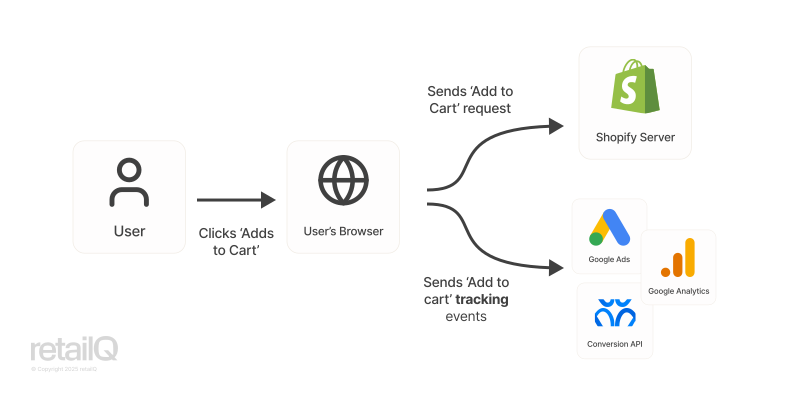
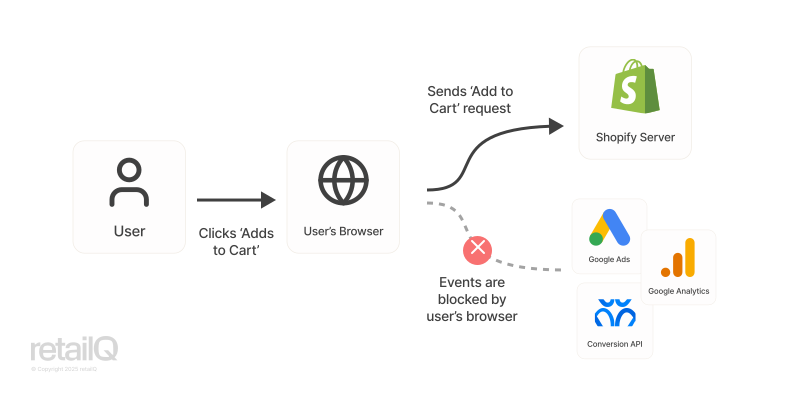
The problem with client-side tracking is that user's browsers, ad blockers and VPNs can automatically prevent cookies and tracking data being sent to analytics/marketing services. They recognise the web addresses of those services and deliberately block them.
Server-side tracking
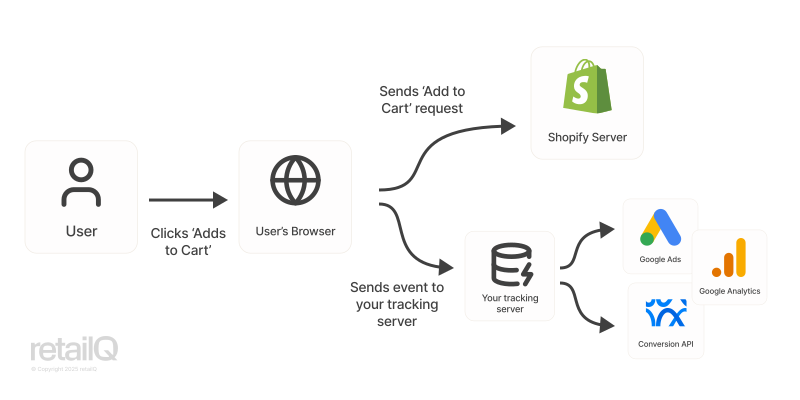
Server-side tracking requires you to set up an intermediate server. The user's browser sends data to your analytics event. Then the data is sent on to your marketing and analytics platforms.
This approach can bypass the automatic blocking of third-party scripts. Browsers block data being sent directly to Google, but do not block data being sent to your server.
What does your server do?
- The server receives data which would normally be sent by the client, like IP address, unique ID for Google tracking, and other metadata
- It maps the data to each destination's format. For example, Google, Facebook and Pinterest all require different data formats. The server processes and filters data to fit each format.
- It can enrich the data (see below) and clean it (de-duplicating events)
- It sends the data to each destination. Tracking servers will also handle more complex logic like retries, logging, and connection errors.
What is tracking data enrichment?
Because you own your tracking server, you can customise it to add extra data to the tracking events.
A common use-case would be to add a customer's ID or product ID to the tracking data. It allows you to link tracking events back to specific customers or products in Shopify. To do this, your tracking server receives data from Shopify. It processes the data and adds it as metadata before sending the event to Google or Meta.
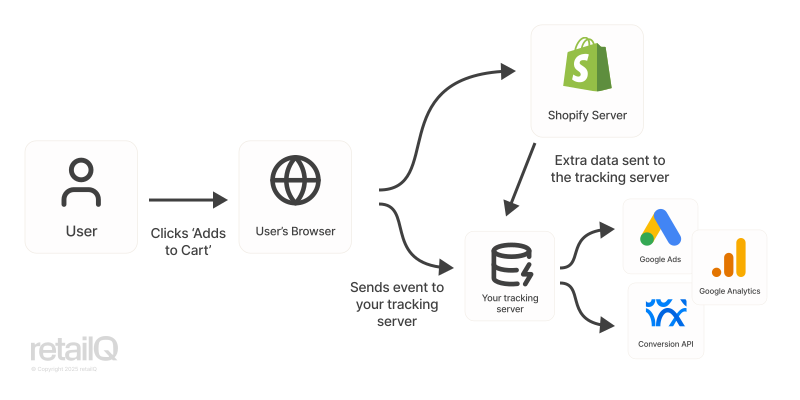
Data enrichment can be extremely powerful. For example:
- You can add data like the customer's segment to automatically retarget them with more personalised marketing
- You're not limited to Shopify. You can add data from your CRM or ERP - or really anywhere - to the analytics event.
First-party tracking
Once you have an app or your own tracking server, you can set it up as a 'first-party' tracker. This is the most accurate tracking setup.
Even when you use server-side tracking, the cookies and scripts which are run on your website can still appear as originating from Google or Facebook. These can still be blocked.
Setting up a first-party tracker means that every cookie set appears to come from your own website. Before, cookies from Google might be set with the domain doubleclick.net (the former name of Google's advertising platform, still used today). Under a first-party setup, they are tagged with your own domain, like analytics.yoursite.com. Ad blockers and browsers allow these because they cannot filter out cookies from Google or Facebook.
First-party tracking requires more setup than server-side tracking, but not much. Most services which host tracking servers allow you (potentially for an extra fee) to add your own domain.
Because your cookies are less likely to be blocked, your tracking accuracy will increase significantly. Additionally, the cookies can last longer: up to several months, instead of 7 days which is a common limit on third-party cookies. With longer cookies, you can identify sessions from the same customer.
GDPR and legislative compliance
Just because you can bypass ad blockers and do-not-track requests does not mean you are allowed to! Legislation like the GDPR gives users the legal right to opt-out of certain tracking. In certain jurisdictions, it is illegal to ignore these.
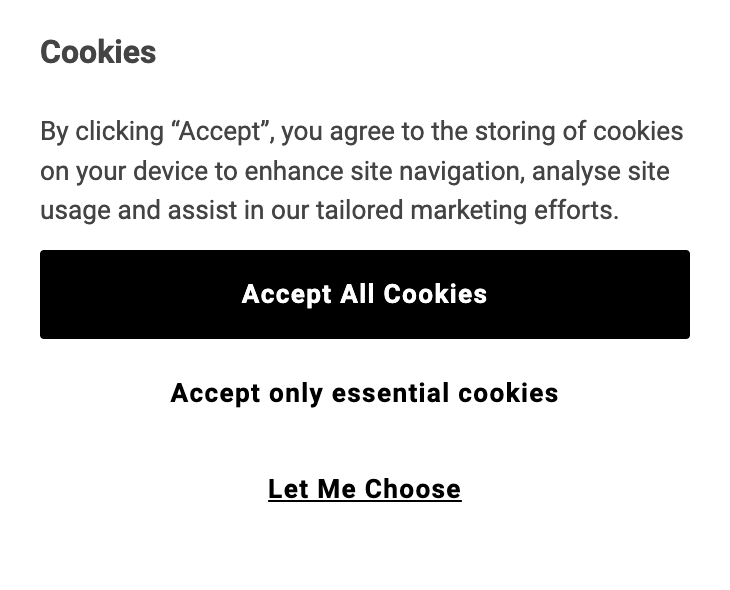
It's your responsibility to make sure that users who opt-out are not being tracked. Most merchants use a Consent Management Platform (CMP) to do this. You'll recognise CMPs as the 'cookie banners' which appear on most websites if you are in Europe. Shopify have their own which appears automatically on stores.
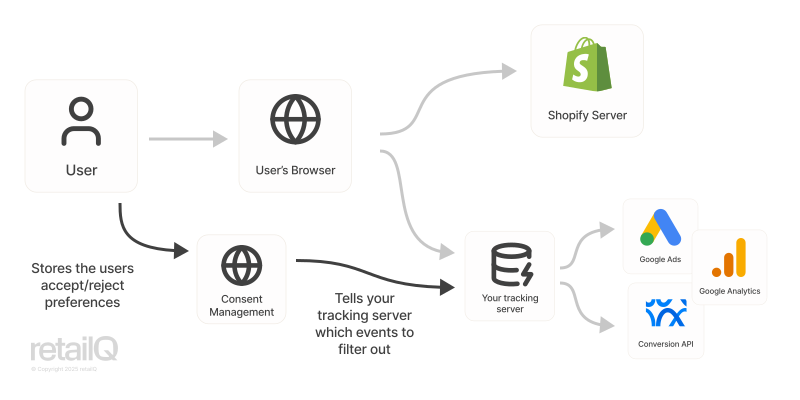
CMPs work by storing the customer's response to the cookie banner. That information is fed into your tracking server, so that it knows which events to filter out:
2. Benefits of server-side tracking
Higher accuracy
The primary advantage of enabling server-side tracking is that it can considerably increase your tracking accuracy versus client-side data.
How much will server-side tracking improve your accuracy?
The best way to measure your current tracking accuracy is by comparing the number of orders per day in Shopify Analytics against the number of conversions tracked in Google Analytics.
For example, if you see 100 orders in Shopify, but only 60 in Google Analytics, then you are missing 40% of conversions.
Ignore the last few days of data because Shopify Analytics and Google Analytics can take some time to fully process. Instead, take an average over the last 1-2 weeks.
Server-side tracking will not be perfect, and you should be skeptical of any offers to achieve 100% tracking accuracy. 90-95% should be possible with a correct setup and a first-party tracking domain.
Reduced client-side blocking
Over the last few years, the data that third-party vendors can collect has become more limited. Marketing platforms like Google, Facebook and TikTok count as third-party vendors.
This trend is only increasing. For example:
- Internet browsers like Chrome, Firefox or Internet Explorer impose rules on third-party scripts and restrict the data that they can send.
- European legislation like the GDPR gives users the legal right to opt-out of tracking, which you must legally respect. Updated CCPA rules (California Consumer Protection Act) come into effect 1 January 2026 and require companies to disclose third-party cookies in more detail.
- Ad blockers are being used more frequently, now by over 30% of internet users. These also limit third-party scripts from marketing platforms.
- Vendors like Apple are also increasing their default privacy settings. Intelligent Tracking Prevention (ITP) is included in Safari, which blocks third-party and even some first-party cookies.
- Earlier in 2025, Shopify changed the default cookie banner to improve compliance with EU requirements, which may lead to more customers opting-out
To future-proof your store against higher restrictions on client-side tracking, now is a great time to switch to server-side tracking. It's especially true if you operate in Europe, where consent legislation is strongest.
Avoids issues with Shopify Checkout tracking
Shopify's checkout is a different, secure environment to your main site. You cannot run custom scripts on the checkout page.
Your client-side tracking scripts can only trigger on the 'thank you' page, not the secure checkout page. If the customer makes a purchase, but does not visit the 'thank you' page, then the sale tracking is missed. Or if the customer uses a payment method like PayPal, which navigates them to pages outside of Shopify to complete the purchase, your scripts may not run.
Improved page speeds
A great reason to reduce client-side tracking is page speed. The small code snippets that you add to your Shopify theme actually load more code from Google or Facebook when the page is shown to your customer.
Those take time to load, and if you have several tracking scripts, they can have a meaningful impact on your page load speeds. Slow speeds are bad for your SEO (search engine ranking), and also hurt your conversions! Even a 1-second increase in page load speed can increase conversion by 2%. That's drastic, and can result in significant sales (for a store doing $10M a year, it would be $200,000 in lost revenue).
3. Limitations to server-side tracking
Cost and complexity
When you add Google Analytics or Facebook's Conversion API (CAPI) to your website as a client-side script, Google and Meta gather exactly the format of data they need. You don't need to process or store any data. It's also completely free.
When you activate server-side tracking, you (or an app you install) must manipulate the data you receive from Shopify to match the format that Facebook or Google need. Analytics data quickly becomes the largest dataset for e-commerce merchants. Even with only a few thousand customers visiting your site per day, you can have millions of events per day. These quickly add up and require dedicated databases and data pipelines.
Most apps providing server-side tracking cost around USD $1000/month.
Less granular data
Server-side trackers generally only capture significant events, like page views, add to carts, and checkout flows. Tracking more granular data, such as user's mouse movements, scrolling, form field interactions and nuanced A/B testing often requires client-side data.
It is possible to track almost anything via a server-side tracker, but the complexity and cost adds up. Most merchants have a hybrid setup: client-side tracking for heatmaps and detailed anonymised usage statistics, and server-side for more significant events.
Latency
Client-side tracking is near real-time. Google and Facebook have high throughput databases and reporting, enabling you to see events as they happen.
When you implement a tracking server, you often have data enrichment and data de-duplication workflows which need to run before sending events to other platforms. To save cost and complexity, these workflows often run in batches every 15 minutes, hourly or even daily.
Reliability
Two recent Cloudflare outages have affected Shopify, and many users noticed follow-on impacts to their tracking data quality. When Shopify is down, it can cause issues with gathering user consent and getting enrichment data.
Server-side cookie blocking
Apple launched Intelligent Tracking Prevention (ITP) which can prevent certain first-party tracking cookies. In a first-party setup, you 'cloak' cookies from Google or Facebook with your own domain. Instead of the cookie appearing from doubleclick.net it appears as analytics.yoursite.com.
Apple have moved to prevent this. Their ITP software, which ships with Safari on Mac and iOS, can disable these cookies.
4. How to set up server-side tracking for Shopify
Server-side apps do a lot: they receive high-throughput data from your users, process and de-duplicate it, enrich it, scrub personally identifiable information, format it and send it to your marketing and analytics platforms, while handling connection or other issues gracefully.
Luckily, you don't have to develop this yourself. There are two main options for Shopify merchants: many apps on the Shopify app store can act as the server for you. Alternatively, you can set up Google Tag Manager servers. GTM servers are essentially a standard protocol for running server-side analytics. Plugins from Google, Facebook and more do much of the formatting work for you.
In the next section, we'll look at these approaches.
Google and Youtube App ❌
Warning! Contrary to common belief, the Google and Youtube App does NOT enable server-side tracking (Sources: 1, 2).
Instead, its an automatic way to correctly set up and control client-side tracking.
It may improve your data accuracy slightly because Shopify recognises that analytics tracking installed via the app (instead of added as a custom block) is more written by Google, and therefore more secure.
Additionally, it will set up e-commerce events in Google Analytics. Google Analytics automatically tracks 'generic' events like page views, and has options for e-commerce events like add to cart, or complete checkout. We recommend using these events, because they give you more detailed reporting relevant to e-commerce.
Shopify server-side tracking apps (2025)
To quickly set up server-side tracking, we recommend using a Shopify App.
These apps act as a tracking server, link directly to Shopify's webhooks and Web Pixel API to enrich your data, and have downstream integrations to services like Google Analytics, Google Ads, Facebook Conversion API, TikTok and more.
Here's a summary table of app options:
| App | Price (December 2025) | Notes |
|---|---|---|
| Google and Youtube | Free | ❌ This is not a server-side tracker! |
| Stape | From $250/year | Based on Google Tag Manager (see below) |
| Analyzify | From $950/year | |
| Littledata | From $950/year | |
| Elevar | From $2400/year | |
| Aimerce | From $3600/year |
We suggest reviewing each app, and their data enrichment options, to decide the best one for your store.
Over the last year, API has been expanded, so it's easier for app developers to create server-side tracking apps. As a result, there could be some solid new entrants in the server-side tracking app market in 2026. That would be great for merchants, because the incumbent apps are currently some of the most expensive apps available!
One of the main reasons to use an incumbent is the wide library of connectors to downstream platforms that they have. You can expect easy connection to your Shopify server-side events, as well as Google Ads, Facebook, TikTok and more. If a new app has the connectors you need, it may be worth a try!
If you're a user or developer of a server-side tracking app not listed here, please reach out to us.
Using Google Tag Manager
If you want to run your own custom server, then creating a Google Tag Manager Server Container is our recommendation.
This approach is more suited to larger merchants who may need custom data enrichment integrations to their ERP, or multi-store merchants who need a single server which tracks across all of their properties.
Google Tag Manager is system that compiles all the code snippets from other platforms together into one client-side tag. That can improve page load times, and makes implementing new platforms into your site easier. Most platforms (Meta, TikTok, LinkedIn, Reddit, Pinterest, Snapchat, etc) integrate with Google Tag Manager.
Since GTM is commonly used across sites, most of the heavy lifting is done for you. Meta, for example, publishes a 'template' for the data they expect from GTM. At a high level, getting the basic event data to Meta will be straightforward. However, adding supplemental data from your product catalog or customer database may require extra engineering work.
You can set up a custom domain for your GTM server to enable first-party tracking.
Stape is a popular app which operates a GTM server container on your behalf. You don't have to deploy or host it yourself, but get the benefits of first-party tracking. If you do not have a technical team or custom data enrichment needs, we'd strongly recommend it over trying to run your own.
Other approaches
There are many other approaches to implement server-side tracking, but generally they're only worthwhile for much larger enterprise merchants.
Segment and Rudderstack are two common examples used extensively by enterprises outside of e-commerce. Snowplow is another example with a data-engineering heavy approach. They are generally more customizable, have extensive integration libraries, but are more expensive, complex to set up, and not specifically tailored to e-commerce.
You can also implement a completely custom approach, without Google Tag Manager or other apps. Be warned, this is complex and expensive, and most companies at the scale where this is a viable option still choose to use commercially available software.
5. How else to improve your tracking
Don't stop at implementing server-side tracking! As your store grows, you'll rely increasingly on complete, consistent data.
Improve Data Consistency
A top priority should be consistent, clean tagging of user events. For example, a user may visit your site while logged out. Then they log in, and add an item to cart. Next, they open your mobile site, and shop some more. Finally, they check out back on their desktop. With server-side tracking, you can tag the customer ID across all of these, so that your analytics platforms know to link the anonymous events with the customer, and merge the desktop and mobile sessions together.
Fix Data Duplication
It's possible you'll see duplicate events, especially in a hybrid setup.
Most apps will eliminate these for you before sending data onwards to your platforms.
Incorrect setups, like manually adding GTM to your theme and also installing the Google and Youtube app can cause event duplication. You should be able to easily identify duplicate events if your sales in Google Analytics/Facebook are much higher than your sales in Shopify!
Standardize your UTM Parameters
UTM parameters help you identify where your traffic is coming from. They're included in the URLs that different websites or ad campaigns use when they point to your site. For example, example.com?utm_source=google for traffic from Google. They can be much more specific, like example.com?utm_source=google&utm_medium=ppc&utm_campaign=summer2025 tells you traffic came from your Summer 2025 pay-per-click Google ad.
Ensure your UTM tags are giving you insightful, granular data. Often we see:
- One large source, with no breakdowns. For example, a brand might use
utm_source=affiliatefor all of their affiliate marketing links, with no further breakdowns. It becomes hard to tell which affiliates are useful and which are not.
It would be much more insightful to use more granular UTM tagging, likeutm_source=affiliate,&utm_medium=toy_reviews, &utm_campaign=emailto identify the specific affiliate and campaign sending you traffic. - UTM sources being too granular. For example, you probably want to track your affiliate traffic against traffic from channels like Google and Facebook. If you have a separate UTM source for each affiliate website, you'll need to manually add up the traffic from each one. The long-tail effect makes it hard to judge how your affiliate marketing performs as a whole.
Audit third-party scripts
Every year, audit your third-party scripts. Previously installed Shopify Apps could have added to your scripts and not been removed when the apps were uninstalled. Or you could still have scripts from platforms you are no longer using for marketing.
It's best to remove these. They slow down your page load speed (which hurts conversion) and increase the likelihood of useful third-party scripts being blocked. Users are also more likely to deny cookie consent if they see a long list of third-parties.
Track back-end events
If you run a B2B or wholesale business, customers may click your ads, but only transact later and pay by invoice. Those conversions will be missing from marketing platforms, but are important to tune your ad audience to the right businesses.
If you're in this situation, you can look at manually sending the conversion events, or integrating your CRM system so that whenever you close a deal, the conversion event is sent correctly.
Contact Us
If you have any questions about server-side tagging for Shopify, or any other e-commerce platform, please email us.