

Summary
The Universal Commerce Protocol is a double-edged sword, with the benefits of new business from agentic sources, but the risk of a new intermediary between you and your customers.
Identity Linking is how you maintain ownership over the customer.
- Identity Linking allows a customer to link their store account to their AI tool. By doing so, they can shop through AI and use their loyalty points or personalised offers.
- Without Identity Linking, all purchases made through AI appear as guest checkouts, where you have the customer's email, but no account.
- Identity linking is optional by default, so it's up to you to implement and enforce. It uses OAuth 2.0: the standard approach used for account authorisation today. However, you most likely will still need to make changes to your backend to fully support it.
- Merchants have the control over whether to enforce identity linking.
- It may add friction to the checkout process, and platforms like Google will push their own sign-in methods like "Sign in with Google". As a result, you may want to incentivise Identity Linking with exclusive offers, loyalty programs, rewards or enhanced service for registered customers.
- The login page will become a key brand touchpoint for customers, so you may want to improve yours.
What is Identity Linking in the Universal Commerce Protocol?
The Universal Commerce Protocol's Identity Linking capability allows users to buy via AI platforms and get the full benefits of being signed in to your store. For you, it means you can also enrol them in loyalty, marketing, and personalisation programs.
You most likely use similar identity linking almost daily. UCP's Identity Linking follows the exact same process as when you click 'Sign in with Google' or 'Sign in with Facebook' on a website. You authorise that website to use the email or addresses saved to your Google account , instead of having to type them in again. You can also allow sites to take action inside your account, like an app which manages your calendar or email.
That's how it will work for stores using UCP. Users can request to 'Sign in with Your Store'. Doing so will give AI platforms like Gemini access to data such as saved addresses, email, phone numbers, and past orders. Gemini will be allowed to take actions on the user's behalf, like creating checkouts, and eventually (these aren't part of UCP today) submitting return requests or cancelling subscriptions.
Payments are not part of Identity Linking. By connecting their account, users do not give permission to AI to authorise payments on their behalf. There is a separate process for that called AP2 Mandates.
How does Identity Linking in UCP work?
Under the hood, UCP's Identity Linking uses a process called OAuth 2.0. It's widely used, secure and the defacto standard for linking accounts across the internet. Here's how it works in practice:
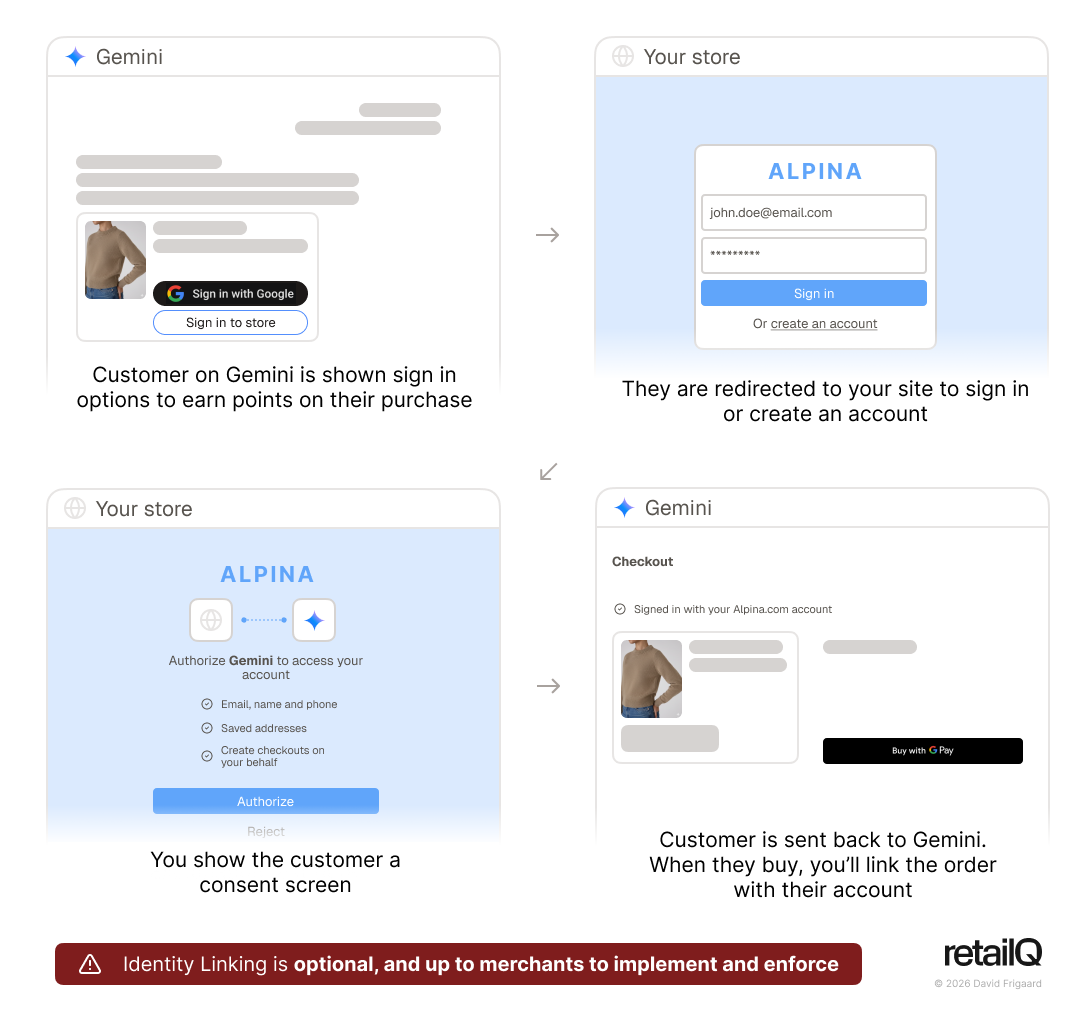
- A user finds a product from your store in Gemini. They already have an account, and want to connect it.
- Within Gemini, they might click a button like "Log in to your Store.com". We don't know exactly how Google will show this to customers yet.
- The user will be directed to your website's login. After signing in, you'll show them a consent confirmation page which lays out the data Gemini will have access to, and what actions it will be able to take on their behalf.
- If a user does not have an account, they will be able to create one as usual before being taken to the consent confirmation page.
- When the user accepts, they're sent back to Gemini and your site securely issues it a 'token' (basically a password).
- Gemini will use that token to request data from your store. For example, it might want to display the last order status. Gemini will request the user's order history using the token. Your store website's backend will verify the token is valid and send back the data.
- Because they're logged in, when a user buys via Gemini, you know exactly who they are. You can add the order to their account, increase their loyalty balance, send them marketing, and so on. Later on, when the user logs in to your website, they'll be able to see the order; it'll be the same as if they had bought it directly from you.
The buyer's identity will stay linked until access is revoked. At any point, the user or your store should be able to withdraw access and prevent Gemini from accessing their data. When Gemini tries to fetch data using its token, you'll deny it!
How can your store implement Identity Linking?
Firstly, you need to implement OAuth 2.0 authentication to support identity linking. That's the process outlined above, where you show the user a consent screen and issue a token to the AI platform.
Many stores' user accounts are unlikely to support OAuth 2.0 today. That said, it is widely used across the web, so can often be added easily. You have a few options:
- Ecommerce Platforms: Some ecommerce platforms manage user accounts for you, and already have OAuth 2.0 functionality.
- Leverage Identity Providers: If you use a service like Auth0 or Firebase for user accounts, enabling OAuth 2.0 is often as simple as toggling on a setting and configuring redirect URLs. You could migrate to one of these platforms.
- Custom build: for homegrown systems, you'll need to build endpoints to issue tokens. This handles the "handshake" process between the AI platform and your user database. Because OAuth is so commonly used, there are many resources online to guide you.
You also will need to consider authorisation. Today, your server might assume that when signed in, the user is allowed to do anything to their account. Going forward, you'll need to distinguish between the human user and an AI agent. For example, AI may be allowed to read some data, but not payment details. Therefore, you will need to check to see if a request is coming from AI and block it.
Once set up, you'll also need to edit your UCP manifest to publicise to AI platforms that you now support Identity Linking.
You may also need to update your privacy policy and terms of service, because you're now allowing users to export data to an AI agent.
By default, Identity Linking - and buyer information - is optional
In UCP, buyer information is completely optional. If your business allows it, AI platforms could connect to your store and make purchases without ever specifying who the buyer is.
The stated purpose is to allow buyer information to be filled out progressively. For example, the AI initiates the checkout process, and your server sends back the cart total with shipping and discounts applied. Only then does the buyer need to fill in their details. By allowing the buyer to do this after seeing the cart total, they're less likely to churn.
It also gives UCP the flexibility to support in-person commerce. When you buy from a street market vendor, they never know who you are. All they have is an anonymised payment reference number. By making buyer information optional, UCP can work in the same way and eventually support this type of transaction.
Luckily (or thoughtfully from the UCP designers), there are ways for businesses to enforce different levels of buyer authentication during the checkout process.
How to enforce Identity Linking
When AI sends a request to your server, you can send back a set of 'Messages'. These cover information, warnings, and errors. For example:
- An error that payment was declined due to insufficient funds
- A warning that the product contains small parts, unsuitable for children under 5
You can add special codes to error messages, including 'missing', 'requires_sign_in', and critically 'requires_identity_linking'.
For example, if you want to prevent anonymous checkouts, you would send back a 'missing' error attached to the buyer email field. By using different messages, you can allow different levels of buyer identification, including anonymous checkouts, guest checkouts, optional identity linking, and mandatory linking. In the table below, we explain how brands can enforce these:
Identification level | Explanation | How to implement | Technical requirements |
|---|---|---|---|
Anonymous checkouts | No buyer information is required | None | |
Guest checkouts | Email/phone required, but no account | Send 'missing' error if the buyer email field is missing | |
Optional Identity Linking | Users can optionally link store accounts or check out as a guest | Enable Identity Linking, but don't enforce it. Optionally, you could send an 'information' message to the user, explaining the benefits of identity linking (special offers/loyalty) |
|
Mandatory Identity Linking | Buyers must create or sign into accounts on your store | Send a 'requires_identity_linking' error | Same as above |
Note: The UCP specification doesn't yet describe how AI platforms should handle the 'requires_sign_in', or 'requires_identity_linking' error codes, but presumably it would direct users to connect their merchant accounts.
Downsides to Identity Linking, and how it impacts merchants' customer relationships
Added friction to the checkout could decrease conversion
Identity Linking adds friction to the checkout process. Google will save buyers' emails, delivery addresses and payment methods to allow them to checkout quickly. Forcing users to sign in or to create a new account on your store takes them out of the checkout process and gives them an opportunity to abandon their cart.
Large retailers may be able to A/B test the conversion impact of different levels of identity enforcement. Your server could randomly enforce identity linking to understand how it impacts conversion rate. Technically, it's also possible for you to dynamically trigger enforcement based on the cart value or the type of the product. For a $10 impulse buy, you could allow guest checkouts. For expensive, high-fraud, or subscription products, the long-term value of having the customer account linked to your database could outweigh the potential churn.
AI platforms will push their own sign-in methods
We have yet to see exactly how major platforms like Gemini will implement the user interface for Identity Linking.
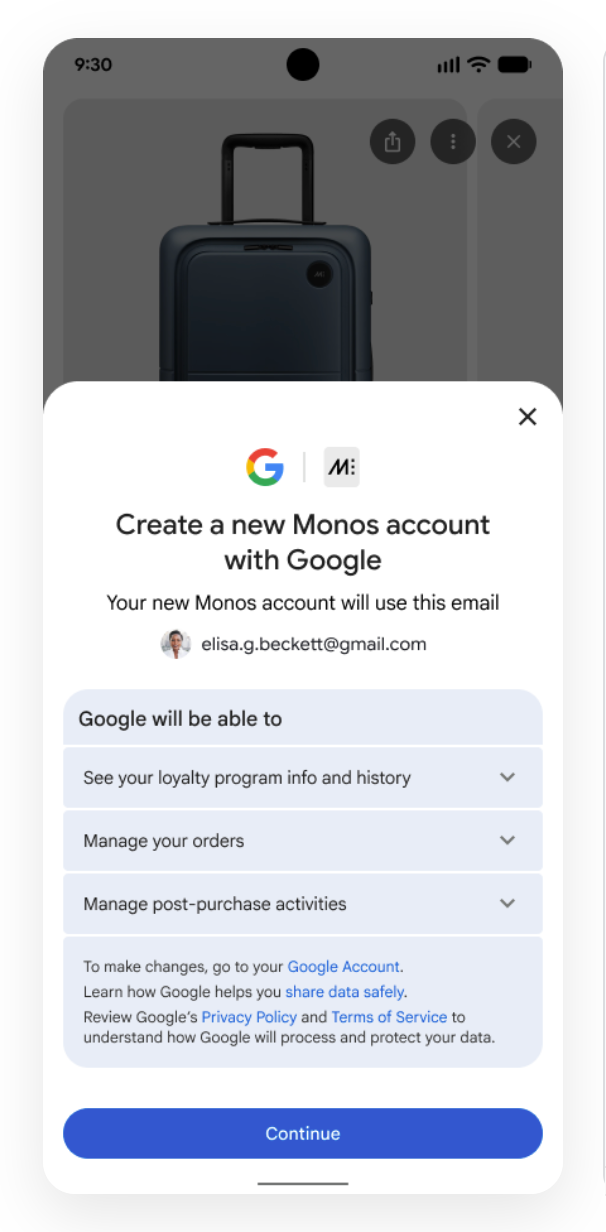
They have, however, previewed a "Sign in with Google" option. If your store permits users to create accounts with Google (often referred to as social login), then Gemini users will be able to sign in to or create a store account in one click. For some merchants, this may be a suitable middle ground. Others will want users to create a native account and will need Gemini to redirect users to their site.
Loyalty, rewards, and offers to incentivise Identity Linking
To convince buyers to leave the "flow" of the AI surface and sign in to or create a store account, you may need to incentivise them. Brands might consider:
- Exclusive pricing: in UCP, you'd be able to provide special 'member's only' or first purchase discounts that only trigger after accounts are linked.
- Loyalty and rewards: remind users that they'll only earn points on their purchases if they link their accounts. You could tell the user to do this by using UCP's messages.
- Enhanced service: give extended returns or free shipping only to registered users. These can be relatively cheap initiatives but drive signups.
Your login page becomes a flagship customer-brand touchpoint
Soon, AI platforms will be able to handle almost all the shopping experience: search, price and product comparison, product pages, checkout UI, order tracking, and even returns. There's a risk your brand becomes "invisible".
The login page therefore becomes a flagship touchpoint with the customer. Account linking might be the only time a customer actually gets to experience your brand voice during the entire transaction.
You should use your login page to:
- Remind the customer about log in benefits, like loyalty and reward programs. You could even do this dynamically based on their shopping cart, for example rendering "Log in to earn 400 points on your purchase".
- Dynamically upsell with an "often bought with" section based on what's in the customer's cart.
- Show beautiful branding and images which compel the customer to remember and come back to your brand.
If your login page is slow, not optimised for mobile, or looks like a basic 2010-era web form, you might erode trust or lose customers.